

Description
Download Mezzmo Trial APK – Media Player, Streaming, UPnP, DLNA, Chromecast
Overview
Mezzmo (Trial) is a free Android application developed by Conceiva Pty. Ltd. designed to serve as a comprehensive media streaming and playback tool for home entertainment systems. The app enables users to access and play various media types—video, audio, and images—directly from their home network. It functions as a media client that connects via Wi-Fi to stream content from local servers or media libraries. Mezzmo supports multiple streaming protocols, including UPnP, DLNA, and Google Chromecast, allowing seamless integration with a wide range of smart devices and home entertainment setups.
It is particularly suited for individuals seeking a centralized way to manage and view media across multiple devices within a household. Whether users are watching home videos, streaming from online platforms, or enjoying music and photo collections, Mezzmo offers a unified interface. The app is ideal for casual consumers and home media enthusiasts who want a simple, all-in-one solution without the need for complex configurations. Its free nature makes it accessible for trial and evaluation purposes, allowing users to experience core functionality before considering a full version.
Key Features & Capabilities
- Multi-Format Media Support – The app can play a wide range of video formats, ensuring compatibility with most locally stored media files without requiring conversion.
- Home Network Streaming – Mezzmo connects to home Wi-Fi networks to discover and stream media from UPnP/DLNA servers and media renderers.
- Chromecast Integration – Users can cast content directly to Chromecast-enabled devices for high-quality playback on larger screens.
- Online Content Streaming – The app supports direct playback from popular websites such as YouTube, Vimeo, VEVO, MTV, CNN, Comedy Central, NFL, and NHL.
- Integrated Media Library – It includes a built-in music player and photo gallery for browsing and viewing audio and image files stored locally or on the network.
- Simple User Interface – Designed with usability in mind, the app features an intuitive layout that simplifies navigation and media selection.
These features allow users to create a personalized home media center. For example, a family can stream a movie from a home server to a smart TV using Chromecast, or a user can browse their photo collection on a tablet while connected to the same Wi-Fi. The app’s ability to handle both local and online content within one environment enhances convenience and reduces the need for multiple apps.
User Interface, Workflow & Performance
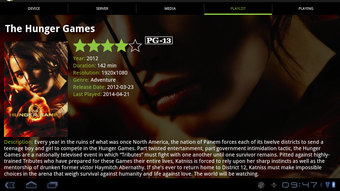
The user interface of Mezzmo (Trial) is designed with simplicity and accessibility in mind. Navigation is structured around a clean, tab-based layout that allows users to switch between video, music, and photo sections with minimal effort. The app’s workflow emphasizes quick access to media, with features like search, recent playback history, and categorized libraries improving efficiency.
Based on general Android application behavior, Mezzmo appears to operate smoothly during media playback, with minimal lag or freezing during typical usage. However, the developer did not specify resource usage details such as CPU or RAM consumption. Performance may vary depending on network speed, device hardware, and the complexity of media files being streamed. Stability during extended playback sessions was not documented, but the app’s design suggests a focus on reliability for standard streaming tasks.
Overall, the workflow is straightforward: connect to the home network, discover media sources, select content, and play. The interface remains responsive during playback, and controls are accessible without navigating away from the current screen. Users can expect a consistent experience across compatible devices, though actual performance may differ based on individual setups.
Compatibility & System Requirements
Mezzmo (Trial) is designed for Android devices. The app is available as an APK file, which allows installation on Android smartphones and tablets. The developer did not provide specific details about required Android versions, minimum RAM, or processor specifications. Installation size is not specified, but typical media player apps of this category usually range from 20 MB to 100 MB.
Compatibility with specific devices or screen sizes was not outlined. The app relies on standard Android networking features, so it should function on devices that support Wi-Fi, UPnP, DLNA, and Chromecast. However, exact compatibility information is limited. Users should ensure their device runs a recent Android version and has active network connectivity to enable full functionality.
Pros and Cons
Pros
- Free to download and use with full access to core streaming features
- Supports a wide range of video formats and online streaming platforms
- Seamless integration with UPnP, DLNA, and Google Chromecast
- Unified interface for video, music, and photo playback
- Simple, intuitive design suitable for non-technical users
Cons
- Exact system requirements were not listed
- Performance data such as CPU or memory usage was not provided
- APK installation may require enabling unknown sources, which poses a security consideration
- Limited information on update frequency or future development plans
FAQ Section
Is Mezzmo (Trial) safe to download and install?
The app is developed by Conceiva Pty. Ltd., a known entity in the media software space. However, since it is distributed as an APK file, users should ensure their device settings allow installation from unknown sources and verify the source before proceeding.
Can I use Mezzmo (Trial) without an internet connection?
Yes, the app can stream media from local network sources such as UPnP/DLNA servers even without an active internet connection. However, online content from platforms like YouTube requires internet access.
Does Mezzmo (Trial) support offline playback?
While the app can play media stored locally on the device, the trial version may not include full offline functionality. Users should check the app’s behavior during testing to confirm.
Is there a license type for Mezzmo (Trial)?
Mezzmo (Trial) is offered as a free trial version. The full version likely includes additional features, but licensing details were not specified in the provided information.
How often does Mezzmo (Trial) receive updates?
Update frequency was not disclosed. Users are advised to check the official source or app distribution platform for the latest version.
Final Thoughts + CTA
Mezzmo (Trial) delivers a solid foundation for home media streaming on Android devices. With its support for multiple protocols, integration with popular online platforms, and unified media interface, it stands out as a convenient tool for managing digital content. The free trial model allows users to test functionality without commitment, making it ideal for those exploring media center solutions.
While detailed technical specifications and performance metrics are not available, the app’s design and feature set suggest reliability and ease of use. It is particularly beneficial for consumers who want a straightforward way to stream video, music, and photos across their home network. The inclusion of Chromecast and online content access adds significant value.
For anyone seeking a free, versatile media player with broad compatibility, Mezzmo (Trial) is a strong candidate. Download Mezzmo now and experience seamless streaming across your home devices.
Guides & Tutorials for Mezzmo Trial APK
How to install Mezzmo Trial APK
- Click the Preview / Download button above.
- Once redirected, accept the terms and click Install.
- Wait for the Mezzmo Trial APK download to finish on your device.
How to use Mezzmo Trial APK
This software is primarily used for its core features described above. Open the app after installation to explore its capabilities.
User Reviews for Mezzmo Trial APK 0
No reviews found





